

Hardware Setup
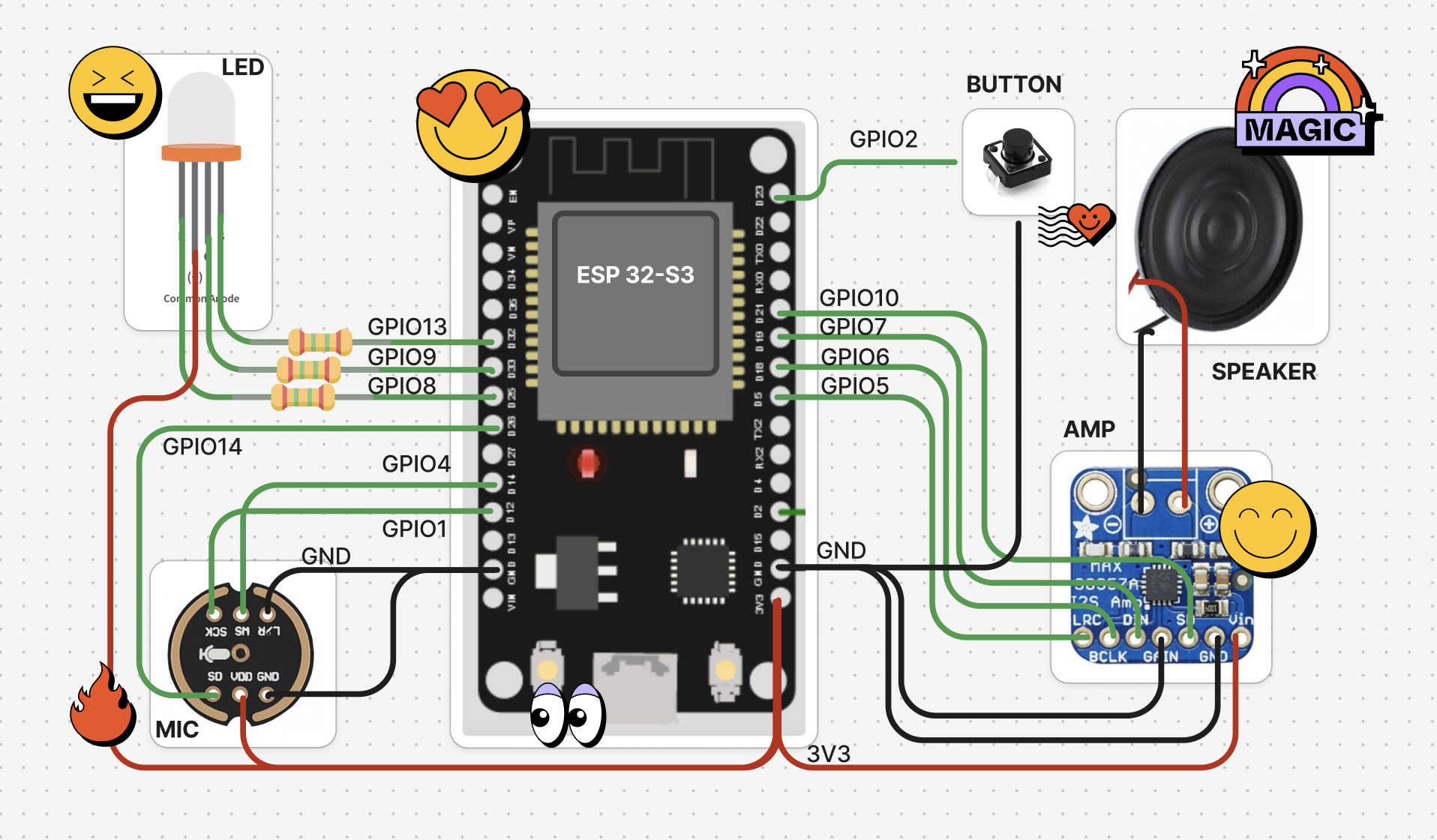
What you’ll need
- ESP32-S3 (by Espressif / Arduino)
- Cables
- INMP441 (I2S mic)
- MAX98357A (I2S amp)
- Speaker
- LED
- Button / Touchpad
- USB cable (power)
Pin Connections
We recommend these pin connections for compatibility with Elato.Config Settings
Before flashing, pick the mode that matches your setup inconfig.h.
Server settings (src/Config.cpp)
- Edit
src/Config.cppwith your server details:- If using locally: Set your computer’s IP address in
ws_serverandbackend_server - If using production: Ensure you have proper certificates set
- If using locally: Set your computer’s IP address in
What’s my IP address?
- View your Wifi IP when you click on Wifi Settings > Your Wifi Network > Details, OR
- On macOS/Linux: Open Terminal and run
ifconfig - On Windows: Open Command Prompt and run
ipconfig - Look for your active network interface (WiFi:
en0on Mac,wlan0on Linux,Wireless LAN adapter Wi-Fion Windows) - Note the IP address (e.g.,
192.168.1.100) - Update the ws server and backend server IP to your local IP address
Ready to Flash your ESP32? ⚡️

PlatformIO (recommended)
Arduino IDE
FAQs
What’s NVS Storage?
We store the following data in Non-Volatile Storage (NVS) on the ESP32:- Auth token: The supabase auth token that is used to authenticate the device with the backend server.
- Factory reset: Whether the device has been factory reset.
- Wifi credentials: The wifi credentials of the device.
How do I connect my ESP32 to Wifi?
- Power on your ESP32
- You should see a WiFi network named
ELATO-DEVICEappear in your phone / laptop’s WiFi network list - Connect to this network
- Navigate to
192.168.4.1in the same phone / laptop’s browser - Enter your home WiFi credentials
- Power the device ON and OFF
- Your ESP32 will now connect to the locally hosted NextJS web-app and Deno server on the same network!
What do the lights mean? 🤔
Green: Setup mode and websocket/wifi is not connected Blue: Device is speaking Yellow: Device is listening to user Red: Processing user request Cyan: OTA in progress Magenta: Soft AP modeTroubleshooting
- If connection fails, check your WiFi signal and that the local server is connected to the same network as the ESP32.
- Make sure an
auth_tokenhas been generated by calling thegenerate_auth_tokenendpoint on the NextJS web-app. - Monitor serial output at 115200 baud for detailed logs.
Need help? Join our Discord community and to any questions and share ideas.