

Prerequisites for running Supabase:
- Docker Desktop (or Docker Engine + Docker Compose on Linux)
- Supabase CLI
Installation
-
Install Supabase CLI
-
Start Supabase locally
-
Verify installation
The output should show local endpoints including:
- API URL: http://127.0.0.1:54321
- Studio URL: http://127.0.0.1:54323
- JWT secret: super-secret-jwt-token-with-at-least-32-characters-long
Configuration
- Environment variables
Add these to your
.env.localand.envfile infrontend-nextjsandserver-denorespectively:
Tables chart
If your Supabase instance is running locally, you can view a live chart of the tables and their relationships here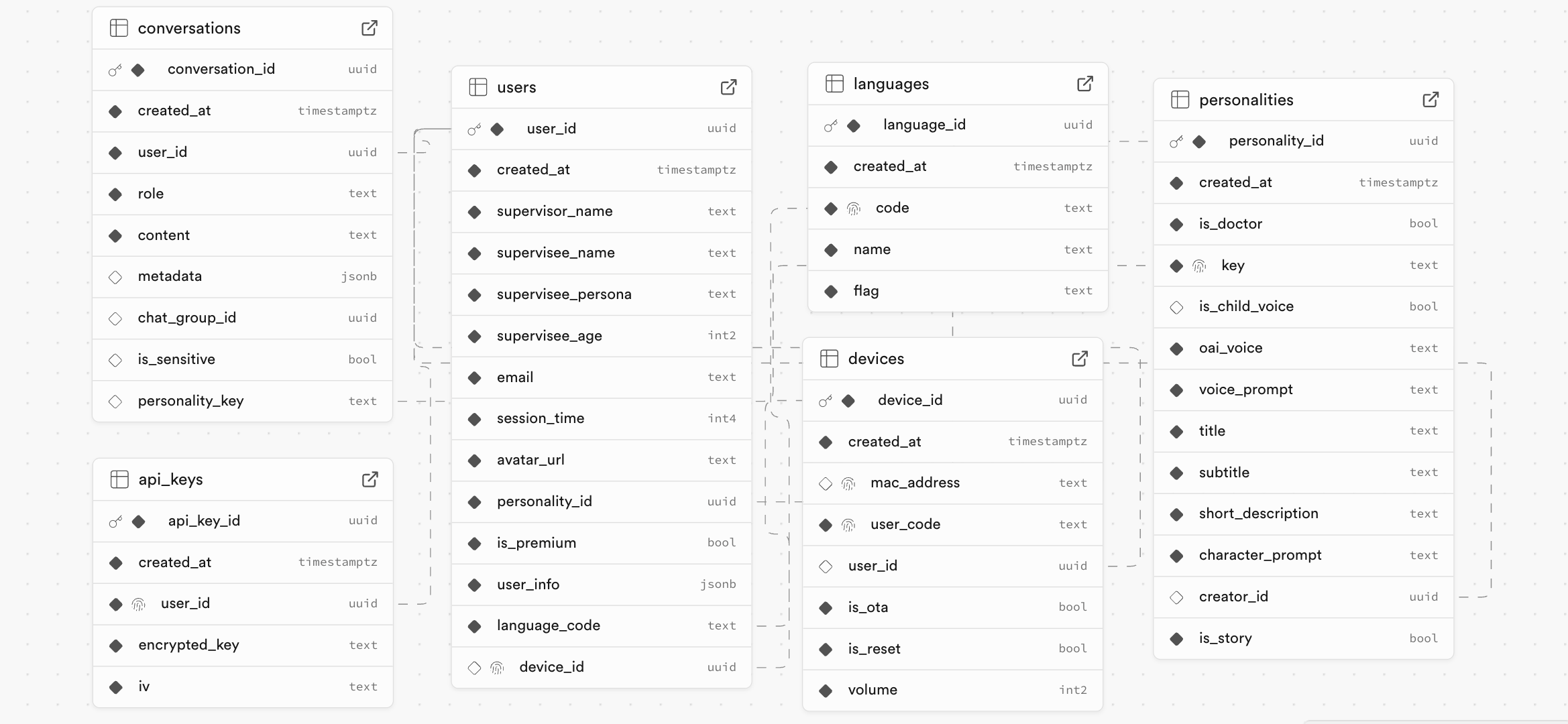
Tables
users- user details are stored heredevices- device details (mac address, device name, etc) are stored hereconversations- conversation details (start time, end time, etc) are stored heremessages- all conversations and transcripts are stored hereapi_keys- api keys are stored here (not used for local)languages- all supported languages are stored here
Development Workflow
- Make schema changes in Supabase Studio (http://127.0.0.1:54323)
- Generate migrations:
supabase db diff -f <migration_name> - Apply to local database:
supabase migration up - Push changes to production when ready
Deploying to your own supabase instance
- Create a new supabase project on supabase.com
- Copy the supabase url and anon key
- Paste them in the
.envand.env.localfile in the root of the project - Link the project to the new supabase instance:
supabase link --project-ref <project_ref> - Run
supabase db push --include-seedto push the changes to the local database and seed the database with the data insupabase/seed.sql